Building a Company Brain
Company
Brain
A Company Asset Everyone Should Have in 2026
David Mill & John Langlois · Scelta
Have the Scelta team build your company brain with you
Company Brain · Scelta
01 / 29
Company Brain · Scelta
02 / 29
The Path

What you walk away with.

Not a seminar. A live build of how a company brain works. You leave clearer on what is possible, with first documents, first skills, and a company guideline. Then Scelta can build it with you.

01The IdeaTHE WHY
02The FileTHE SKILL
03Live BuildTHE PROOF
04ExamplesTHE FILES
05Next StepsTHE PLAN
Company Brain · Scelta
03 / 29
The Problem

Go from reaction to reasoning.

Right now the day runs you. The goal is a company where every decision is backed by rationale.

FIREFIGHTING

Whatever screams, wins.

Reaction, all day. Never the three things that actually move the company.

IN YOUR HEAD

The company lives in your head.

Pricing, process, people. None of it written anywhere. AI fails when that context is missing, not because it is incapable.

AI AT 10%

You already use AI.

Just not to its potential. Someone on your team is already in ChatGPT or Claude with company data, whether leadership knows or not.

Company Brain · Scelta
04 / 29
What we are going to learn today

Treat AI like it’s a really detailed construction project.

You’re not working for the AI. Now your AI is working for you.

Company Brain · Scelta
05 / 29
Buildables

Your company is already built in pieces.

Contractor or developer, you run the same six divisions - and each one is a stack of repeatable, document-heavy processes you already run every day. That is exactly the work AI thrives on - with a human in the loop.

Sales
Marketing
Operations
Accounting
Finance
Field
Each process is a buildable. Each buildable fits in one file.
Company Brain · Scelta
06 / 29
The .MD File

How do you document a buildable?

An .md file. A text file. Simpler than a PDF or a Word doc, a notepad with headings, bullets, and bold. Nothing to buy. Nothing to install.

daily-log.md
# Daily Log - Unit 2 ## CREW - 4 on site, framing - Sparky's crew arrives 1 PM ## WORK DONE 1. North wall framed 2. Electrical rough-in started ## FLAGS **Change order** - client moved a door on the south wall.

Daily Log - Unit 2

CREW

  • 4 on site, framing
  • Sparky's crew arrives 1 PM

WORK DONE

  1. North wall framed
  2. Electrical rough-in started

FLAGS

Change order - client moved a door on the south wall.

Not software you buy. The format AI reads and writes.
Company Brain · Scelta
07 / 29
Why Markdown

Every AI answer starts as markdown.

Ask AI for anything - a quote, a report, a schedule - and the answer is written in markdown first. Everything else is a conversion.

AI writes markdown
↓↓↓↓
PDF
Word doc
Excel
Live app
It all starts in plain text. That is why the brain is built from it.
Company Brain · Scelta
08 / 29
The File

One buildable.
One file.

One process. One file.

Three parts. Every time. Start. Process. Output.

That is a buildable. The way your best person does it. Written down. Forever.
change-order-log.mdOPERATIONS
## START
▌▌▌▌▌▌▌▌▌▌▌▌
## PROCESS
▌▌▌▌▌▌▌▌
▌▌▌▌▌▌
▌▌▌▌▌▌▌▌▌▌
▌▌▌▌▌▌▌
## OUTPUT
▌▌▌▌▌▌▌▌▌▌▌
Company Brain · Scelta
09 / 29
Scale

Sounds like a lot? You already know all sixty.

Ten per division. Your best people run them every single day.

0 files. That is a company brain.
You’re really only 60 documents away from creating your company brain.
And do not worry - you will not type a single one by hand. We show you how, then we can build it with you.
Company Brain · Scelta
10 / 29
The Brain

This is what your company knows.

Six divisions. Sixty buildables. One connected brain, with Claude at the center reading every file. Nothing lives in one person's head anymore.

Hover a division to light up its buildables. Drag anything.
"How does our change order process work?"
"What is our follow-up cadence after a quote?"
"Walk the new hire through payroll prep."
Company Brain · Scelta
11 / 29
Memory

Stop starting from scratch.

If you do not set up these documents - these .md files as memories - every time you go back to AI, it forgets you.

50 First Dates Without a Brain

50 First Dates.

Like Adam Sandler in the movie: reintroducing yourself every morning because she has amnesia. That is AI with no company brain.

Tony Stark and Jarvis With a Brain

Jarvis knew Tony Stark.

Everyone was blown away by Iron Man. The reason it worked: Jarvis knew who he was, what he needed, and could act for him.

Company Brain · Scelta
12 / 29
Connect

Plug in what you already run on.

This is not about buying one massive ERP. Plug in the tools you already run - and the brain reads them automatically.

Hover a tool to see what flows in. Drag anything.
"What did we promise in that meeting?"
"Pull every photo from Unit 3 this week."
"Which invoices are still unpaid?"
Eventually you stop opening the tools. Claude becomes the command centre that speaks to all of them.
Company Brain · Scelta
13 / 29
Plug In · Meetings

AI meeting transcription tools.

Granola

If you do one thing with AI after this, record your meetings.

The transcript is the raw material. Once you have it, you can pull actions, promises, change orders, follow-ups, and the truth of what was said, without anyone rewriting the day from memory.
Scelta · Company Brain
14 / 29
The Why

You already paid for this data. The brain is how you get paid back.

Layer 01 · Field Data

Captured where the work happens.

  • Hours, location, photos, checklists, expenses, change orders
  • Captured on site, on a phone, in seconds
  • No retyping. No end-of-week catch-up.
Layer 02 · Live Job Financials

Every job, priced in real time.

  • Real-time P&L on every job
  • Budget vs actual, updated as the field reports
  • Change order impact, per job, same day
Layer 03 · Pattern Recognition

The patterns you could never see.

  • Where time gets lost, week after week
  • Which crews outperform, and on what work
  • What actually kills margins
Layer 04 · Benchmarking

Pricing power, earned from your own data.

  • True cost per trade, job type, and crew
  • Bids built on your record, not a guess
  • Every finished job sharpens the next one
Layer 05 · Claude

Ask anything. Answer in seconds.

  • Your jobs, crews, costs, and site activity
  • Every answer traceable to a log, a photo, an invoice
  • The brain below feeds every reply
Scroll to build
Company Brain · Scelta
15 / 29
The Layers

Turn what you know into AI systems that improve how work gets done.

Who’s clocked in right now and where?

Claude

Ask anything about your jobs, crews, costs, and site activity

Which jobs made us the most money this year?

Benchmarking & pricing power

True cost per trade · job type · crew · smarter bids

Pattern recognition

Where time gets lost · which crews outperform · what kills margins

Live job financials

Real-time P&L · budget vs actual · change-order impact per job

Field data extraction

Hours · location · photos · checklists · expenses · change orders · productivity

Company Brain · Scelta
16 / 29
Live Build

You will not build this by hand.

We built a skill that builds the brain with you. It interviews you like a colleague - what is your role, what do you actually do all day - then maps your divisions and writes the files.

1Download the skill. One file, right from this page.
2Drop it into Claude. Drag and drop, any conversation.
3Answer the interview. Your role, your people, how work flows.
4Tweak the map. It proposes your divisions and processes. You correct it.
5It writes the brain. Every file - plus the index that links them.
company-brain/FILES + INDEX
company-brain/ ├─ CLAUDE.md ← the index ├─ sales/ │  └─ quote-follow-up.md ├─ operations/ │  ├─ daily-log.md │  └─ change-order-log.md ├─ accounting/ │  └─ invoice-run.md ← linked from change orders └─ field/    └─ photo-upload.md

The one prompt maps your company’s skeleton - divisions and processes only, no files. The skill builds the whole brain.

It is not just the files. The index links them, so Claude can walk your company like a map.
Your tools plug in either way

Company Brain · Scelta
17 / 29
Live Build · Where the files live

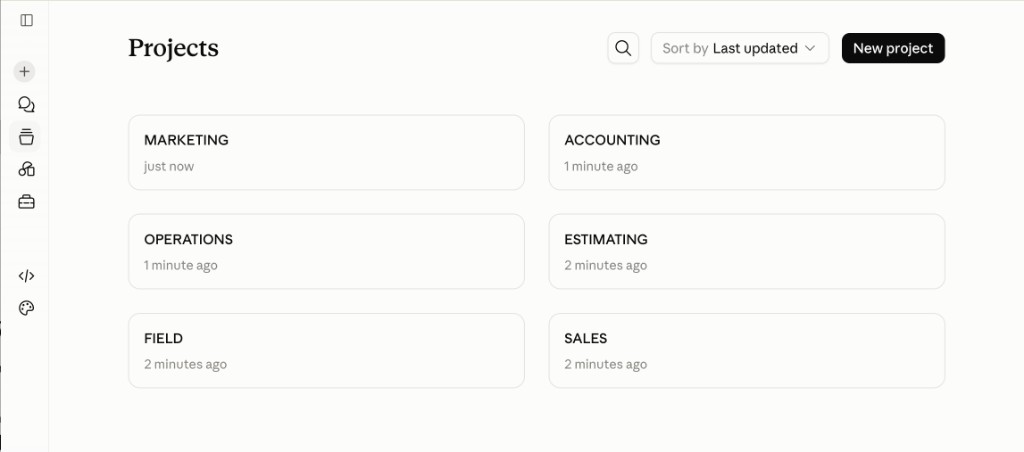
Each division becomes a project.

Sales. Marketing. Operations. Estimating. Field. Accounting. One Claude project per division, so the context stays with the work.

Claude projects for each company division
Company Brain · Scelta
18 / 29
Live Build · Estimating

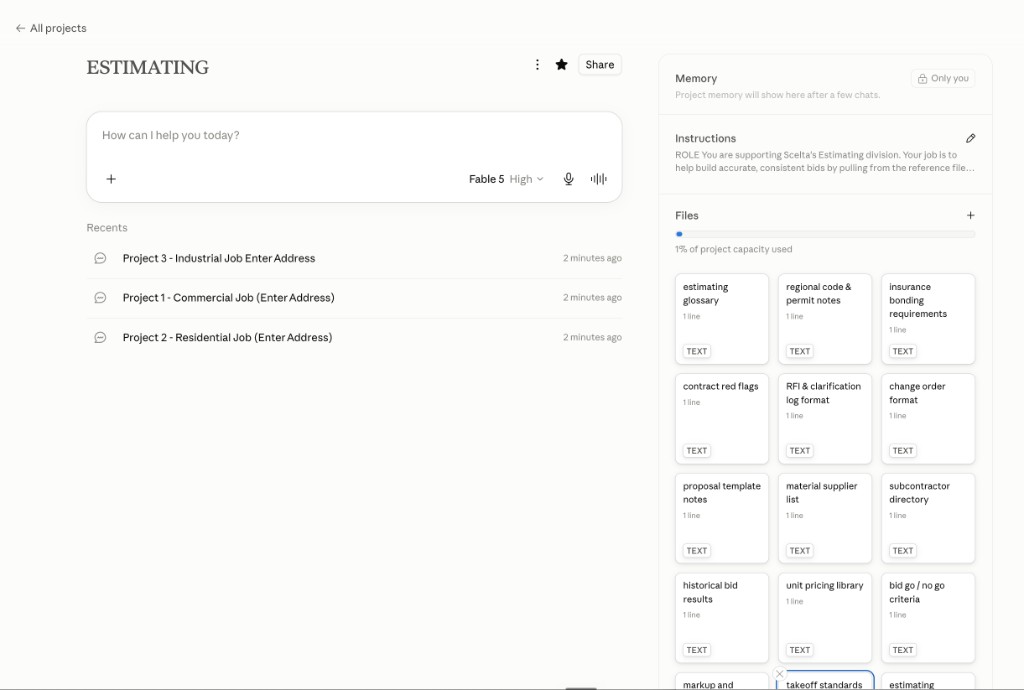
This is where those .md files go.

Instructions and reference files sit in the project. Chats are the jobs: named by job number and address, so Claude already knows the rules before you talk about Unit 2.

Estimating project in Claude with context files and job chats
company_overview.md estimating_role_charter.md team_roster.md estimating_workflow.md takeoff_standards.md markup_and_margin_rules.md bid_go_no_go_criteria.md unit_pricing_library.md historical_bid_results.md subcontractor_directory.md material_supplier_list.md proposal_template_notes.md change_order_format.md rfi_and_clarification_log_format.md contract_red_flags.md insurance_bonding_requirements.md regional_code_and_permit_notes.md estimating_glossary.md
Company Brain · Scelta
19 / 29
Safety & Security · Access Control

AI can only access what you give it. Control the door first.

Same model as email, cloud storage, or any enterprise app. AI has a trained base knowledge - but it only gets your data through one of three doors:

01 · Upload

A file someone drops in.

A document, spreadsheet, or photo added to a conversation. Gone once the conversation ends, unless retention says otherwise.

02 · Typed input

Whatever someone types.

Including things that should never be typed - passwords, SINs, banking details. This is the door most leaks happen through, because it feels like “just asking a question.”

03 · Direct connection

A connector to your systems.

Gmail, Drive, your CRM, your ERP. This is the door with the most reach - and the one access controls matter most for.

You wouldn’t hand every employee admin access to your accounting system. Don’t hand every AI connection the same reach either.
Company Brain · Scelta
20 / 29
Safety & Security · The Guideline

Managing the three doors.

Your team is already using AI. Personal accounts. Company data in chats you cannot see. Context walking out the door. These three moves are how you take it back.

01 · This week

Train your team.

One page: what goes in, what never does. Passwords, SINs, banking details - never typed, never uploaded, on any tier.

02 · This week

Consolidate your connections.

One managed business account, not personal logins. Personal accounts can’t be governed - you can’t see or limit what’s connected.

03 · This week

Turn off training. Understand data retention.

On a business account, the vendor should not train on your chats or files - get that in writing. Then confirm how long they keep it and whether you can delete it.

Protect it like you’d protect a login to any system that touches company data - because that’s exactly what it is.
Company Brain · Scelta
21 / 29
Safety & Security · The Precautions

What if my data leaks?

That’s the right question - and it’s answerable, not a leap of faith. Once access is controlled at the door, the remaining question is what happens to data on the other side of it.

01

Storage

Where does it sit, and who can read it?

02

Backup

If something fails, what’s the recovery guarantee?

03

Flow

Where does it go once it leaves your hands - and does it come back?

Every serious vendor has already answered this for an auditor. The question is whether you’ve asked to see the answer.
Company Brain · Scelta
22 / 29
Safety & Security · The Certifications

These aren’t badges. They’re audits of exactly what you’re worried about.

SOC 2 Type II

An auditor watches the system operate over months, confirming controls hold up in practice, not just on paper.

ISO 27001

The security management system itself: access granted and revoked, incidents handled, encryption at rest and in transit.

ISO 42001

AI-specific governance, over the AI lifecycle specifically.

GDPR / HIPAA-readiness

Your right to know what’s stored and request deletion; the bar for surviving a serious breach attempt.

A vendor doesn’t pass once and keep the badge forever. They get re-audited continuously, or they lose it.
Company Brain · Scelta
23 / 29
Safety & Security · Trust

Banks, hospitals, and government already said yes.

Compliance teams whose job is saying no to unsafe vendors said yes to Claude. If it is safe enough for patient records and bank fraud systems, it is safe enough for job costing and daily logs.

Who already trusts Claude
Goldman Sachs Blackstone Commonwealth Bank Snowflake Pfizer NASA
How Claude handles files

Claude does not take your files.

On a business account, your chats and uploads are not used to train the model. They stay in your project. You can delete them. Claude reads what it needs to do the work, then writes back into your system.

The DoD story

They said no to the Pentagon.

Anthropic refused to waive rules on mass surveillance and autonomous weapons. A company that will say no to the U.S. military takes your data seriously too.

Banks, hospitals, and government agencies all have compliance teams whose entire job is saying no. They said yes to Claude.
Company Brain · Scelta
24 / 29
Safety & Security · Try It Yourself

Get a custom security report for any AI vendor. Run it yourself.

Copy this prompt. Paste it into whatever AI tool you’re already using. Swap in the vendor name. It pulls the trust center and hands you back plain answers to the doors and the certs above.

Pulls storage, backup, flow, training, retention, and current certifications from the vendor’s public trust docs.

If it can’t explain a clear answer to these questions, it is not mature enough to trust yet.
Company Brain · Scelta
25 / 29
Examples

A few examples of .md files.

Pick a division. This is what its first buildable looks like.

change-order-log.mdOPERATIONS
Company Brain · Scelta
26 / 29
Review

What this all adds up to.

Six things. If you can repeat these, you know how a company brain works, and why Scelta should build yours with you.

1The why. Every dollar, hour, and photo you already pay for can feed a brain that answers anything.
2The .md file. Plain text. Three parts, every time: Start. Process. Output.
3The brain. Six divisions, sixty buildables, one folder Claude reads end to end.
4Plug in. The tools you already run on feed it automatically - Google, Microsoft, or both.
5The build. One skill interviews you. The brain writes itself - files plus the index.
6Run AI on purpose. Guideline. One shared platform. Training off. Do not leave it to chance.
One folder. Sixty files. That is the whole secret.

Company Brain · Scelta
27 / 29
Keep Building

Have Scelta build your company brain with you.

You can start with one file. The brain gets built one file a week. Two ways to keep going with us.

Community

Join the free community.

AI for Contractors. Weekly live calls, the buildable library, and a room full of owners building the same brain you are.

Build with Scelta

Sit down with our team.

We will map your company and build the brain with you. dmill@scelta.ca  ·  226 347 6758

Book a meeting. We will build it with you. The worst plan is starting alone and stalling.
Company Brain · Scelta
28 / 29
Start Today

Define it today.

We have the greatest tool of our generation. Better than, bigger than WiFi, almost.
1Run the prompt we gave you. Map your company’s skeleton this week.
2Build the first docs and skills. Interview your team on who already uses AI. Put a company guideline in place.
3Book Scelta. Sit down with our team and we will build your company brain with you.

David Mill

Founder & CEO, Scelta

dmill@scelta.ca  ·  226 347 6758

John Langlois

CTO, Scelta

scelta.ca

Keep Building

AI for Contractors · AI for Developers

Weekly calls, buildable library, and the community that holds you to it.

·  One Step at a Time. Ferociously.
Company Brain · Scelta
29 / 29
Questions

Q&A Time.

Ask about security, the sixty files, the skill, or how Scelta builds a company brain with your team. Hard questions welcome.

Scan to join the AI for Contractors community